Tips for Using the Rotax iS Lane Check Tool
The Flight Data Viewer’s Rotax iS Lane Check tool will help you determine the RPM drop during a Rotax iS engine lane check.
This analysis will work with the Rotax 912 iS, Rotax 915 iS and Rotax 916 iS series of engines. It will NOT work for any of the carbureted Rotax engines, such as the Rotax 912 ULS.
Test procedure
During engine warm up perform the Rotax iS engine lane checks as documented in your Rotax operators manual. Always follow your aircraft's specific documentation. Typically the lane check involves a) increasing the throttle to
4000 RPM, b) switching off Lane A for 3 seconds, c) turning Lane A back on, d) switching off Lane B for 3 seconds, and e) turning Lane B back on. Observe the RPM drop when a Lane is switched off.
Post Flight Analysis:
- After the flight extract the data from your SD card using standard procedures.
- Click the RPM tab.
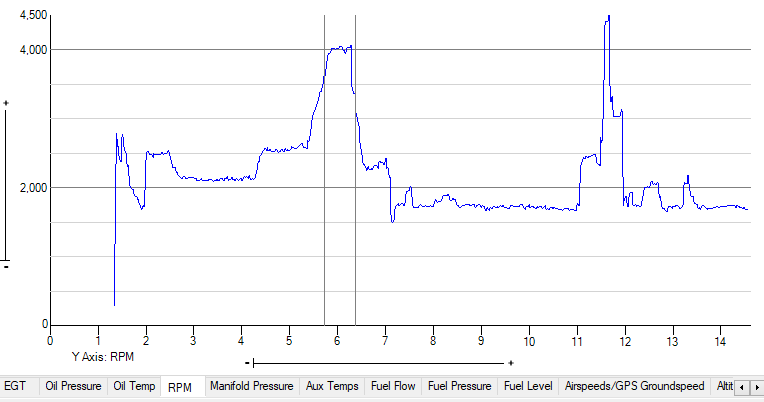
- Select a range that includes the Lane check test. Refer to Figure A. (See for complete range selection instructions.)
- Click on the graph just before the start of the 4000 RPM area,
- Hold down the ‘SHIFT’ key,
- Click on the graph just after the end of the 4000 RPM area.
| Figure A |
 |
- Make sure the ‘RPM’ tab is still visible.
- From the menu select ‘Analyze’ --> ‘Rotax iS Lane Check’ --> ‘Rotax iS Lane Check’
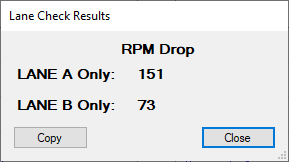
- The analysis will run and the results will be displayed. See Figure B.
| Figure B |
 |